Understand your links
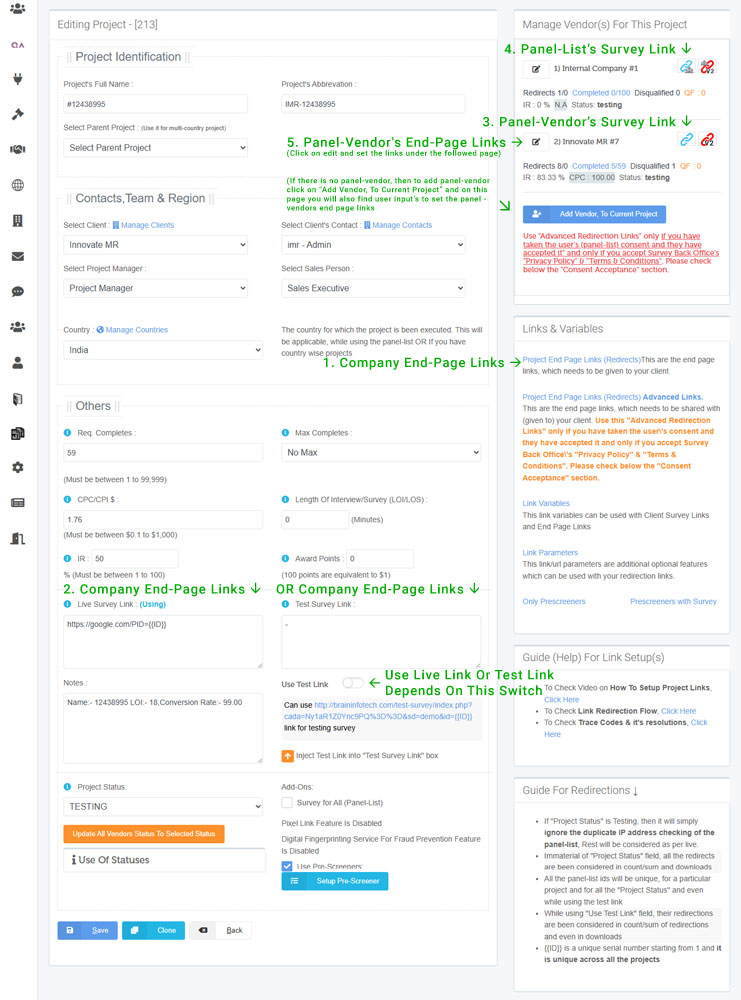
Majorly there are 5 type of links, which you should be aware of
-
Your (companies) End Page (redirection) Links
These are your end-page links. End-page links means after the survey is finished, it will redirect to these link. As per "Survey Back Office" there are 3 type of end-page links. Completed, Dis-Qualified and Quota-Full. If the survey finishes successfully then it redirects to Completed Link. If the survey get's dis-qualified then it redirects to Dis-Qualified link and if the survey quota is over, then it redirects to Quota-Full link. These links client will setup in their software/tool
Share With : These link you need to share it with your client.
Variable Details:-No variable is required (as parameter value) in these link, as these are static links.
-
Client's Survey Link.
These is the survey link, if you redirect to this link then it shall start the survey, you must be able to see the survey question and answer page.
Get From: These link you need to get it from your client
Variable Details:- Can use {{ID}} variable (as parameter value) in these link for sharing unique ids with client. can also use {{CLIENTKEY}} variable (as parameter value) in these link if these project has unique links given by your client. These variable data will be shared with your client. Note: id is a universal unique serial number generated by the system
-
Panel-Vendor's Survey Link
These link is generated by "Survey Back Office" and redirecting to this link shall gradually move to the (above) client's survey link. These link is exclusive for the panel-vendor and it is unique across each project and panel vendor. Be sure to share the correct link with the relative vendor.
Share With : These link you need to share it with your panel-vendor.
Variable Details:-No variables are required here, but the vendor needs to pass the panel-list id in the link against the link parameter pid.These value can be alpha-numeric and shall be unique for each project.
-
Panel-List Survey Link
These link is also generated by "Survey Back Office" and redirecting to this link shall gradually move to the (above) client's survey link. These link is exclusive for the panel-list and it is unique across each project and panel.
Share With: These link you need to share it with your own (internal) panel (panel-lists).
Variable Details:-No variables are required here, but the vendor needs to pass the panel-list id in the link against the link parameter pid.These value can be alpha-numeric and shall be unique for each project.
-
Panel-Vendor's End Page Links
As like you provide your end pages, these links are the end-pages of your panel-vendor. After the survey is finished, it will redirect to your (company) end-pages (described above) and then redirect to the end-page of the panel-vendor.
Get From : These link are provided (shared) by your Panel-Vendor.
Variable Details:- Can use {{panellist_id}} variable (as parameter value) in these link for sharing back the panel-list id with your vendor. These variable's data will be shared with your panel-vendor.
From Where To Get These Links
All the links are available under the project edit page (section)
- From Main Menu Click On "Project Management"
- Then if you have created projects, then you will get a list of projects, Here you need to click on "Edit Project" icon.
- Once you are in "Project Edit", check the below screenshot.