Setup Of API
To use SBO's Survey Insights API, you can follow the below steps:-
- Goto Your Company's Accounts Profile Page
- Add An API Password and Save
- Goto Edit Company (client/vendor)
- Under the "SBO's Insights Exchange API" section add ALL under "Show Projects or Redirection Insights"
- Now share the below credentials with your companies
- From Company's Accounts Profile Page, share "API's User Name & API Password"
- From Company's Edit Page, share "Secret API Key"
- Now share the urls (links) credentials with your companies. Base link must be https://api.surveybackoffice.com/
- Add on link for getting list of survey surveys where ### is must be the project number
So the full link must be https://api.surveybackoffice.com/surveys
- Add on link for getting list of survey surveys where ### is must be the project number
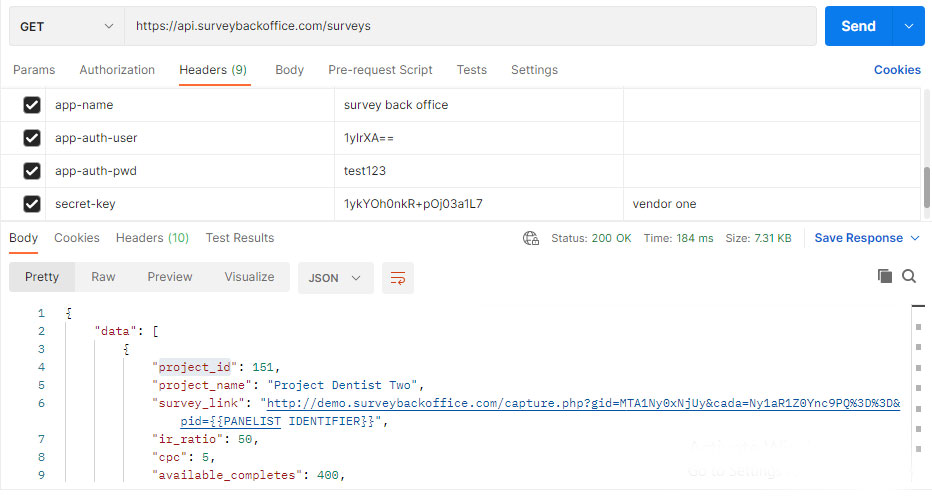
- Along with sharing the above credentials the company (user) using the api also needs to set some api headers
- First the header KEY must be app-name and it's value must be surey back office
- Second the header KEY must be app-auth-user and it's value must be [API's Username] (shared from the first credential)
- Third the header KEY must be app-auth-pwd and it's value must be [API Password] (shared from the first credential)
- Fourth the header KEY must be secret-key and it's value must be [Secret API Key] (shared from the second credential)
Filters & Ordering
The SBO (Survey Back Office) Insights Exchange APIs facilitates the developers to filter and order the api's response data. To use the same, the developer need to pass api headers with their relative key and value(s).
- For filtering data, the developer needs to add api-addon-where as key and "field/column name equals to value" as value. Note this filters are addon filters and it won't overwrite the mandatory where conditions of the apis. Let's check an example, let's say you want to filter surveys based on the country america then your api headers must contain api-addon-where: country_name like "%America%"
- For ordering data, the developer needs to add api-order as key and "field/column" as value. Note:- This will overwrite the default order of the api. Now lets check an example, let's say you want to order data based on project name then your api headers must contain api-order: project_name"
Note: To know the field/column names you can refer the data that is provided by the api.
Image Of Sample Setup Done in Postman :-