
Understand Unique Links
What are unique links ?
Unique links are survey links only, but each survey/study would have a different link. Which means the primary domain would be the same, but the link parameters will vary and will be unique for each survey, but for a particular project only. It might be same or different for each project, which totally depends on your client who provides you these links.
From where to get unique links ?
Your client will provide you an excel or a csv file for your project, which shall have multiple rows containing link
How to use unique links in Survey Back Office ?
To use unique links in survey back office you need to import a unique link csv file to the related project and once the unique links are successfully imported, then after you need to use those links through a variable {{CLIENTKEY}}. Details steps are provided below:-
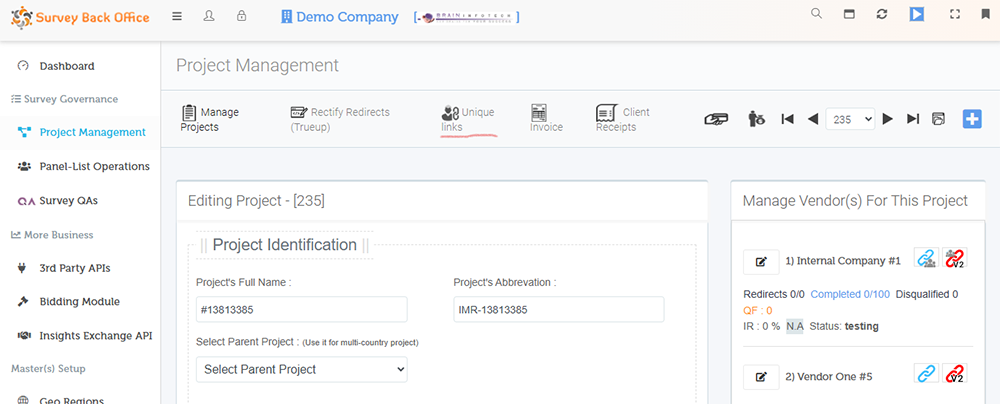
- Import the unique link csv file through "Unique Link" option found under "Project Edit" page. Note: The csv file format shall have only 1 column without heading and the column shall contain only the link part without the main/primary domain.
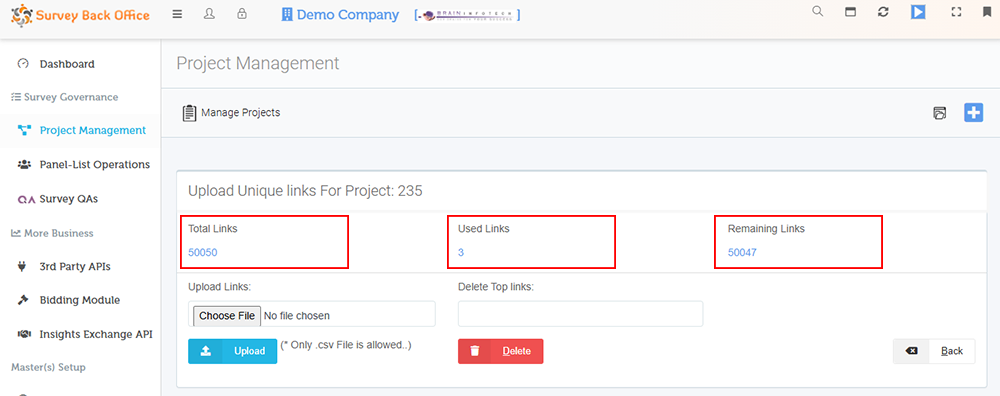
- Under unique link page, you will have 3 sections "Total Links", "Used Links" & "Remaining Links", after the import is done successfully, the total imported links, count shall be shown under the section "Total Links"
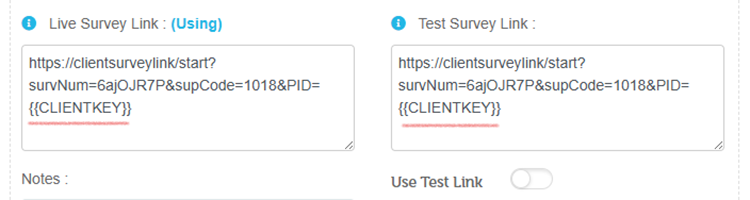
- Once the import is successful and you verify the count, then after add the unique links variable {{CLIENTKEY}} in "client survey link" founder under the project edit page and save the project. Once these is done you ready to test.
- For testing execute the panel-list/vendor's survey link and when it navigates to the client's survey link, be sure to check that you get the imported survey link added to the panel-list/vendor's survey link url in the browsers address bar. If you get it then the unique link setup seems to be fine.